Guides/Google review removal tools
Google review removal tools. What each one actually does.
Reviewed by Doug Baker, founder · Updated September 23, 2026 · Policy text snapshot August 2026

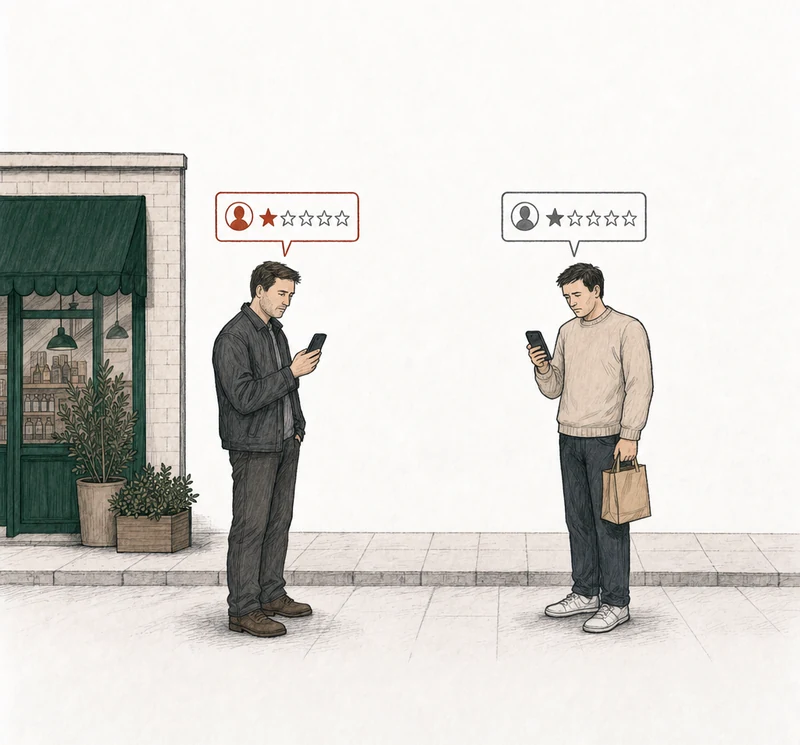
Four one-star reviews. Two break a Google policy. A tool that flags all four is wrong about two.
Two one-star reviews. One breaks a Google policy. A tool that flags both is wrong about one.
What is the Google review removal tool?
Google does have a review removal tool of its own. It's called the Reviews Management Tool. You open it with the Google account on your Business Profile, report a review, and come back later to see where the report stands. If Google keeps the review, the one appeal starts there too. What it doesn't do is remove anything. It sends Google a report, and Google decides.

Google describes the tool in one line.
Use this tool to report review removals and check review status.
Google Business Profile Help, Manage your Google Business reviews
Google's help text captured August 4, 2026.
And when you report a review, here's what Google decides on.
You can report any review, but only those that violate Google policies are eligible for removal.
Google Business Profile Help, Report inappropriate reviews on your Business Profile, section Understand which reviews to report for removal
So no tool removes a review, and that includes Google's own. Google removes a review when its content breaks a policy. Whatever another tool does for you, the decision stays with Google. Ours is free, and it tells you which of your reviews have grounds for removal. It's the analysis further down this page.
Start with Google's
What does Google's own review removal tool do, and not do?
It reports a review, shows you the status of that report, and holds the one appeal if Google says no. You pick the reason yourself, and it doesn't write the argument for you. It takes a report for any review you point it at, so the tool won't stop you from reporting one that breaks nothing. Before you open it, take a minute to see whether your review has grounds for removal.
The appeal is where the tool matters most, because you only get one.
Google puts it plainly on its help page for owners.
If you disagree with the decision, you can submit a one-time appeal.
Google Business Profile Help, Report inappropriate reviews on your Business Profile, section Report inappropriate reviews with the Reviews Management Tool
Here's what the tool leaves to you. When you report, Google asks you to select a reason, and its help page gives only two examples from that menu, spam and profanity (Google Business Profile Help). Which reason fits your review is your call. The appeal is a form you fill in, free text with no upload field, so every screenshot you have has to be written out as sentences. And none of Google's published steps asks you to pay. If you want the screens in order, we cover removing a bad Google review, step by step on its own page.
What Google's tool does, and doesn't
- Reports a review. Any review on your profile, under your own login.
- Shows its status. You come back to the same tool to see where the report stands.
- Holds the one appeal. If Google keeps the review, the appeal starts here.
- Leaves the reason to you. You select why you're flagging the review.
- Doesn't write the argument. The appeal form is a blank box.
- Takes no attachments on the appeal. Your evidence goes in as words.
What do other Google review removal tools actually do?
Other Google review removal tools do most of their work before a report goes to Google. They read your reviews, match them to a policy, and some draft what to say. Then the report goes to Google, and a few keep track of it after that. There are at least four kinds of software, plus services, which are people rather than software. Each one is easiest to understand by what it does and who presses submit.
The kinds of removal tools, and who files for each
- Policy analyzers. Browser extensions and scanners that read a profile's reviews against Google's policies and point out the ones that may break one. They submit nothing. You file.
- Report assistants in reputation software. An add-on inside software a business already pays for. It flags reviews against policy, names a category, and drafts the justification. You send the request from inside the software.
- Reporting dashboards. Built for agencies and businesses with several locations. They track what was reported, where, and its status. The owner or the team files each report.
- Tools that say they file for you. Some advertise submitting reports automatically on your behalf and resubmitting every month. The tool says it files.
- Services. People you pay, not software.
Services are a different purchase, and Google review removal services compared is where we cover them. The rest of this page is about software and Google's own tool.
Read the reviews
Every kind of tool on this page does some of this.
Match a policy
A tool can point to the policy a review breaks, if it breaks one.
Draft the argument
A tool, or a person, can write what the report or appeal says.
Report to Google
A report can start from the Business Profile, the Reviews Management Tool, or Google Maps. The appeal goes through the Reviews Management Tool.
Google decides
Google removes the review if it breaks a policy and keeps it if it doesn't.
Who files when you use a Google review removal tool?
You file the appeal. Google's Business Profile API, one way software reaches your reviews, has no method to report, flag, or appeal a review (Google's Business Profile API reference). It lets a program list and read reviews and write or delete your reply. Google documents three places a policy report on a review can start: your Business Profile, the Reviews Management Tool, and Google Maps. The appeal goes through the Reviews Management Tool, which starts by asking you to confirm the email associated with your Business Profile (Google Business Profile Help, Google's Report or Fix Content help page). So if a tool says it files for you, ask how its reports reach Google before you pay.
Some tools advertise resubmitting every month. Here's what Google says happens after it declines a report.
If we do not remove the content you reported, you may be eligible to submit one appeal.
Report or Fix Content, Maps User Generated Content Policy Help, section What to expect after you report a review or media
One appeal per review, ever. The appeal names a policy, and a mismatch can waste your one appeal by presenting the wrong policy argument.
The Google Maps app also keeps a Reports section that lists the reviews you've reported, each with a status (Google's Report or Fix Content help page). One status is "Content not removed," and Google gives two reasons for it.
The status, in Google's words.
Content not removed: The content has not been removed because either your account has been restricted or we do not have enough information to support the removal.
Report or Fix Content, Maps User Generated Content Policy Help, section What to expect after you report a review or media
Our rule is simple. We never submit anything to Google. You file from your own profile, with the argument we prepared. What goes into that argument is covered in the one appeal, argued right.
Does yours qualify?
Which reviews can a removal tool help with?
Through a report, only the ones whose content breaks one of Google's published policies. No tool changes that, because the tool isn't the one deciding.
Google tells owners the same thing about its own flag button.
Do not report a review just because you disagree with it or dislike it.
The rest of the extract
Google doesn’t get involved in conflict between businesses and customers.
Google Business Profile Help, Report inappropriate reviews on your Business Profile, section Understand which reviews to report for removal
Google's content policy also allows reviews that describe a negative experience respectfully (Google's prohibited and restricted content policy). Take two one-stars that sting about the same. "Waited forty minutes and they got the order wrong" is a bad visit, told plainly, and Google keeps it. A review that threatens to hurt the owner is harassment, and Google's harassment policy names a specific threat of harm outright. Harassment is one policy of several, and the full set is the policy categories, in Google's words.
Most profiles don't have a review like the second one. About six in ten profiles we analyze have no review with grounds for removal. We say so plainly, with a reply playbook attached. So a tool that flags every one-star on your profile is flagging reviews Google keeps.
Or have us analyze it
What does RatingMinder's free review analysis do?
We analyze every bad review on your profile against Google's written policies, meaning every review at 2★ and below with at least ten characters of text. Each one gets a verdict: strong grounds for removal, possible grounds, or no grounds. No email, no account. Like every tool on this page, ours doesn't remove anything. It tells you which reviews give you grounds under Google's policies.
Of reviews we flag as having grounds, 93% were confirmed by expert adjudication against Google’s written policies (65 of 70 flags, n = 164 adjudicated reviews). Our assessment accuracy, not Google’s removal rate; removal outcomes publish as they accrue. You can read how the analysis was measured on the pilot and the numbers we publish.
Where there are grounds, we prepare the appeal and you file it. How the appeal is prepared is laid out step by step. One review is $149. Every review with grounds from that analysis is $199 for all of them together. Monitoring is $39 a month. Prices are per Business Profile, and what an appeal costs, in print has the details.
The review gets removed, or your fee gets refunded. The appeal fee only, never subscriptions. The terms are in the appeal guarantee.
No email. No account. The answer is free either way.
Each review comes back with one of three:
Strong grounds for removalPossible grounds for removalNo grounds for removal

Before you pay
What should you ask a removal tool before you pay?
Ask who files, and ask what the tool does when a review has no grounds. Most of what you need to know comes out of those two answers. Then read the policy sentence the tool points to, yourself, before anything goes to Google.
Questions for any removal tool
- Who files? If the answer isn't "you," ask how the report gets to Google.
- Does it quote the policy? You should see the sentence of Google's it's arguing from.
- Does it tell you when there are no grounds? A tool that flags everything isn't telling you which reviews have grounds.
- Does it treat the appeal as one per review? Google allows one appeal per review, ever.
- What do you pay, and when? Per review, per location, or per month, and whether you pay before or after Google decides.
- Does it promise removal? Through a report or an appeal, only Google removes a review, so no tool can promise it.
If you're weighing a firm rather than software, choosing a removal service covers the questions to ask people you'd pay. We've also compared four of them by name, in Removify, compared, Erase.com, compared, NetReputation, compared and Guaranteed Removals, compared. And ask us the same six questions. You file. We quote the policy. We tell you when there are no grounds, free. The appeal happens once. The fee is printed. We don't promise removal. We promise your fee gets refunded if Google keeps the review. On a $199 order, the $199 is refunded if Google keeps every review in it. The appeal fee only, never subscriptions.
When there are no grounds
What if no tool finds grounds for removal?
Then no tool will move that review. Google removes reviews on policy. Appeal a review that breaks no policy anyway, and Google assesses it, leaves it up, and that review's one appeal is spent.
What's left is smaller than removal and still worth doing. Fix whatever in the review is true. Reply in public. Google lets you reply once your business is verified (Google's Manage customer reviews help page). Answer the complaint itself, and accuse nobody of anything. How to write that reply is covered in replying to a bad Google review. The reviewer can edit or delete their own review (Google's Report or Fix Content help page), so a review can still come down that way. If you contact them, offer nothing. Google doesn't allow merchants to offer payment, discounts, or free goods or services in exchange for revising or removing a negative review (Google's prohibited and restricted content policy).
No tool can change that answer, and we won't charge you to try. When there are no grounds, that's the answer. Also free.
Common questions about Google review removal tools
Is there a free Google review removal tool?
Yes. Google's own Reviews Management Tool is the one Google gives every owner, and none of Google's published steps for reporting or appealing asks you to pay. Our analysis is free too, with no email and no account. It tells you whether a review has grounds. Google still decides.
How much does Google review removal cost?
As far as Google's own steps go, nothing. None of them asks for payment. What you might pay for is help before you file. Some software is priced per location, some per month, and some comes as an add-on to reputation software. Ours is printed in the section above, per Business Profile. For firms, see what removal services charge.
Can you report a Google review that breaks the law?
Yes, through a separate channel. Google applies its content policies to Maps everywhere, and on top of those, users can report content they believe breaks local law through Google's Legal Removals page. That's a legal question rather than a policy one, and this page isn't legal advice.
Can a business see a Google review that was removed?
You can see whether a review you reported came down. The Google Maps app's Reports section gives each of your reports a status, and "Content removed" means Google removed that content from Maps (Google's Report or Fix Content help page). If a review disappeared without anyone reporting it, that's a review that disappeared on its own.