Can it be removed?/Remove fake Google reviews

How to remove fake Google reviews: What Google actually removes

Reviewed by Doug Baker, founder · Updated September 24, 2026 · Policy text snapshot August 2026

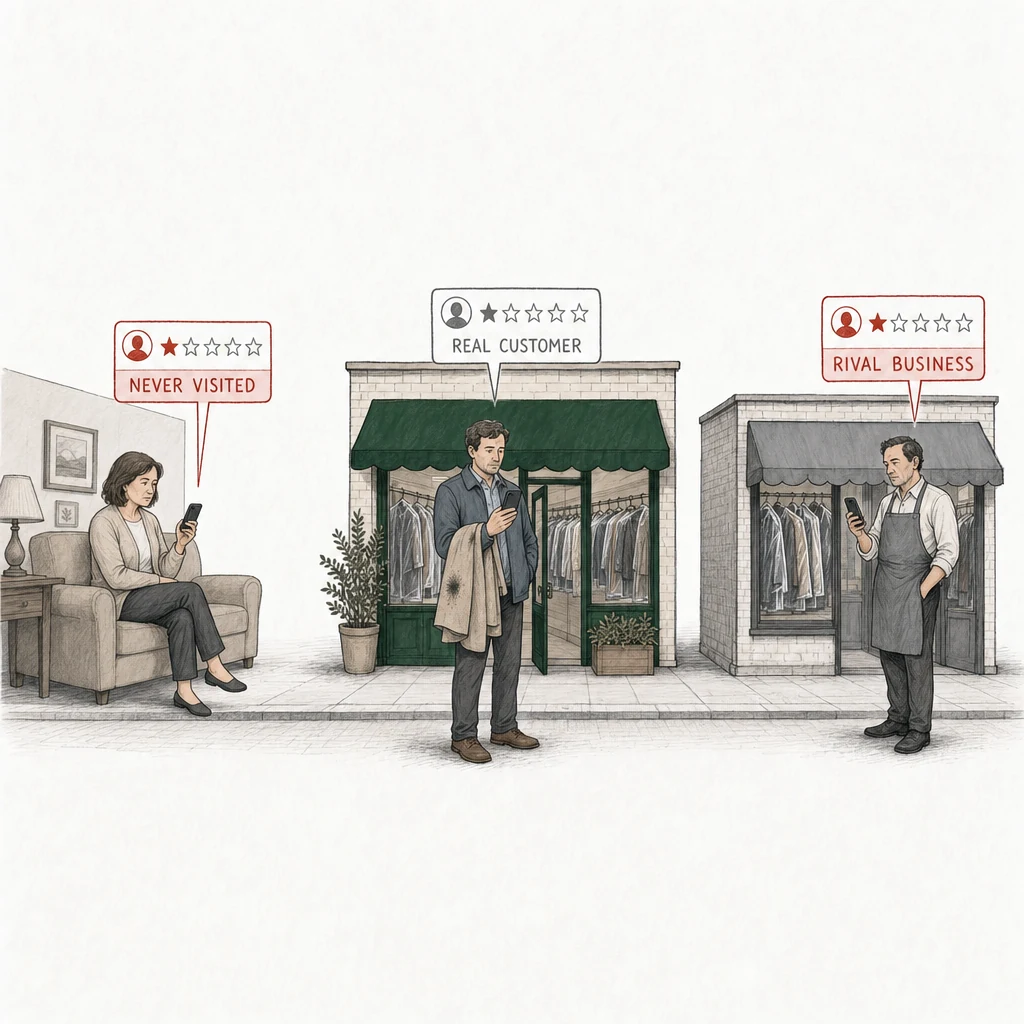
Illustration: a dry cleaner under a green awning and, a few steps along, a rival dry cleaner under a gray awning. Three people, each posting a one-star review from a phone. Two of the review cards are drawn in red and labelled with who the writer is: Never visited, a woman in an armchair at home, far from the shop; Rival business, the rival cleaner's owner in a gray apron outside his own shop. On the pavement in front of the green shop's door, a customer holding a coat with a stain on its collar posts a one-star review drawn in plain gray, labelled Real customer.
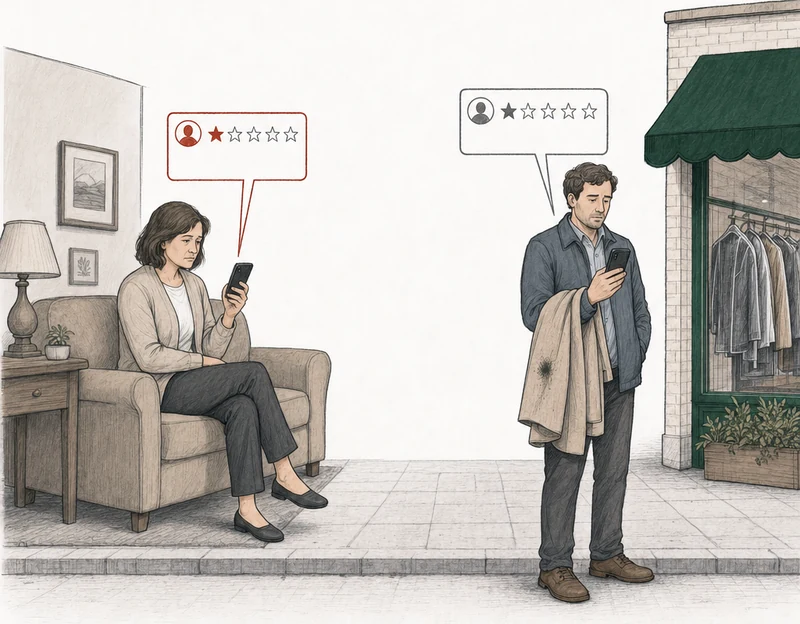
Illustration: two people, each posting a one-star review from a phone. At the left, a woman in an armchair at home who has never been to the shop; her review card is drawn in red. At the right, apart from her, by the green-awning dry cleaner, a customer holding a coat with a stain on its collar; his review card is drawn in plain gray. Labels: Never visited, Real customer.

Google's fake engagement policy reaches two of these three reviews. It doesn't reach the real customer.

Google's fake engagement policy reaches the one who never visited. It doesn't reach the real customer.

You can't remove a fake Google review yourself. Google can, and it does when a review breaks one of its policies. But none of Google's policies is called "fake reviews." The nearest thing is a heading, "Fake & Misleading Content & Reviews," that sits over Fake Engagement. So the work is finding the rule the review actually breaks and showing Google the evidence for it.

Say a one-star showed up from a name that isn't anywhere in your records, and you already went looking. That search matters, and we'll come back to it. Google doesn't remove reviews because you say they're fake. It removes them when the evidence shows a policy violation. The closest Google comes to a definition is one line in its policy glossary: fake engagement is content that doesn't represent a genuine experience. It says nothing about how harsh the review is.

Which Google policies does a fake review actually break?

Usually one of four. In our read, a review an owner calls fake lands under Fake Engagement, Off-topic, the conflict-of-interest clause under Rating Manipulation, or Impersonation. Which one depends on what the review says and who could have written it. You can work it out by hand below, or run the free analysis on your reviews and see which ones have grounds for removal.

Fake Engagement is the one for a review with no real experience behind it. Someone who never came in. Someone who was paid. One person posting from several accounts. Google's Fake Engagement section also names a competitor posting on your business to hurt it. The details and worked examples are on our page about fake engagement in Google reviews.

Off-topic covers a review that isn't about an experience at your business at all. If it clearly names some other business, another location, or a place you couldn't have served, that's the cleaner argument. A complaint about a service you don't offer isn't enough on its own. That's evidence, not grounds. Our page on off-topic Google reviews shows where the line sits.

Rating Manipulation holds the conflict-of-interest clause. It names current and former employment, family ties, and industry competitors outright. Google repeats the conflict-of-interest sentence under Misrepresentation, but without the examples of competitors and family.

Impersonation is the narrow one owners miss. It covers a review posted in a real person's name by someone who isn't that person. If a customer tells you they never wrote the review under their name, read about impersonation in Google reviews.

A one-star you'd call fake may not reach any of these. A real customer who had a bad day and wrote it up badly is still a real customer. That review stays up.
Does yours break it?

Two similar reviews. One breaks the policy.

Same dry cleaner, same one star, same complaint about a ruined coat. Only one of them was there. Both are samples we wrote for this page.

Breaks the policy

Priya S.
Strong grounds for removal
★★★★sample

Never used this place and never will. My neighbor says they ruined her coat and the owner just laughed at her. Stay away.

Fake EngagementNever visited

The writer says they never used the business, so the review isn't based on their own experience. That's what Fake Engagement covers.

Doesn't break it

Glen R.
No grounds for removal
★★★★sample

Dropped off my wool coat and it came back with a stain on the collar that wasn't there before. The owner just shrugged. Stay away.

Does not coverReal customer

This one describes a visit and what went wrong. It may be unfair to you, but it's a real experience, so the policy doesn't reach it.

The difference is one sentence. Priya's review tells Google there was no visit, so Google can see the violation without taking your word for anything. Glen's doesn't, and even if you can't find him in your records, the review reads like a customer's.

No grounds for removal

When there are no grounds, that's the answer. Also free.

Google's wording, unedited

Here's the clause from Google's Fake Engagement section.

Content that is not based on a real experience or does not accurately represent the location or product in question.

The rest of the extract

Contributions to Google Maps should reflect a genuine experience at a place or business. Fake engagement is not allowed and will be removed.

This includes:

  • Reviews or ratings that have been paid for, directly or in kind.
  • Content that has been posted from multiple accounts by or at the request of one person.
  • Content that has been posted using an emulator or other device tampering service, modified operating system, or other method to mimic genuine engagement, manipulate sensor data or results, or otherwise thwart or confuse normal operations.

We do not allow merchants or users to:

  • Solicit or encourage the posting of content that does not represent a genuine experience.
  • Offer incentives – such as payment, discounts, free goods and/or services - in exchange for posting any review or revision or removal of a negative review.
  • Post content on a competitor’s place or business to undermine that business’ or product’s reputation.

Google, Maps user-generated content policy, Prohibited & restricted content, section Fake Engagement

Google's policy text captured August 4, 2026. Section headings re-checked against the live page September 3, 2026.

Save it first

What evidence do you need before you report a fake review?

Four things, and your records come first. Search the reviewer's name across your sales system, your booking calendar, your customer list and your email, and screenshot the search that comes back empty. Then the reviewer's public profile. Then when the review landed compared with your normal week. Then any competitor the review names or praises.

Start with the empty records search. WiserReview's guide calls it the strongest single piece of evidence in a fake engagement appeal, and we agree. Then save what the reviewer's profile shows before you file. Google can remove parts of a reviewer's profile or restrict the account, and what you'd want to show may go with it.

What to save

  • Your records search, with the empty result on screen.
  • The reviewer's profile: how old the account is, and how many businesses it has reviewed, in which cities, over what stretch of time.
  • Your normal weekly review count, next to the week this one arrived.
  • Any competitor's name in the review, quoted exactly.

Now the limit. "They were never a customer" isn't a policy violation by itself. It has to be argued as fake engagement or as off-topic, with the evidence above attached to that argument. BrightLocal (November 2025) makes the same point: reviewers don't need to be customers. And you can describe an account's public behavior and your own records. You can't know who wrote a review, and an honest appeal doesn't claim to.

Which patterns are evidence, and which are only suspicion?

Spotting fake reviews on Google isn't something you can file. Evidence is anything a person at Google could check for themselves. An account created last month. Forty reviews across six cities in two weeks. Five one-stars in a day on a profile that averages two a week. Google's Rating Manipulation section covers unusual volumes or patterns of reviews aimed at a place's rating, so a spike like that has a policy home. We cover it on its own page, for when the reviews come in a wave.

Suspicion is everything else. The review sounds generic, the writing sounds angry, the profile photo looks stock. Nobody reading an appeal can check those, so they don't go in one.

What does Google's automated detection catch on its own?

A fair amount, before anyone reports anything. Google says its machine-learning systems scan contributions for signs of suspicious activity, and that content they find is either removed automatically or sent to trained staff who look at it. Separately, Google uses automated spam detection on reviews, and it says openly that the system sometimes removes legitimate reviews by mistake.

So a review that looks like obvious spam can come down with no report at all. Don't wait to find out. Reporting doesn't use up your appeal, and Sterling Sky makes flagging the review its first step, then says to wait three business days before checking the status. And if a real customer's good review disappears, the spam filter is one possible cause. For that one, Google's help page says to contact support.

File it yourself

How do you report a fake Google review to Google?

From your Business Profile, open your reviews and select Report next to the one you mean. The Reviews Management Tool does the same job and shows the status of every report you've made. Google's help page says you can report any review, but it only removes the ones that break its policies.

  1. Save the evidence.

    Screenshot the review, the reviewer's profile, and your empty records search.

  2. Report the review.

    From your Business Profile, pick the menu reason closest to your argument.

  3. Wait for Google.

    Google says evaluation typically takes several days.

    Decision pending
  4. Appeal once.

    Report reviewed - no policy violation

    If it stays up, name the policy the review breaks and write your evidence out as sentences.

The report, then the appeal. Drawn by us, not a screenshot of Google.

The report asks you to pick a reason, and here Google's documentation runs out. It gives two examples, spam and profanity, and doesn't publish the rest of the menu. So we can't tell you what yours says. On the Local Search Forum in June 2025, Stefan Somborac's advice was to pick the closest reason the menu offers and make the real argument in the appeal. The full walk-through, menu and all, is on choosing the report reason.

Google says evaluation typically takes several days. It publishes no timing for the appeal.

You can also report the reviewer's profile, separately. Google only allows that from the Google Maps app on a phone, and only when the profile's contributions break a policy. It's a report on the account, not a second try at the review.

What happens if Google finds no policy violation?

You get one more chance, and only one. TrueReview reports that most first reports come back with no violation found, which is why the appeal is where the work goes. Google allows one appeal per review, ever. Our read is that the policy named has to match the argument. Before you spend it, read one appeal per review, ever.

Two things decide the appeal. The first is the form. It's free text with no upload field, so your screenshots don't go in. You write them out as sentences. The account was created last month. It has reviewed 40 businesses in six cities in two weeks. No sale, booking or email exists under that name. Plain facts you can stand behind.

The second is the policy you name. For a review with no experience behind it, that's Fake Engagement. For one about some other business, it's Off-topic. Name a policy that doesn't match your argument and you can waste the one appeal by presenting the wrong policy argument. You file it yourself, from your own profile. We never submit anything to Google.

Or have us analyze it

How do you tell which of your reviews has grounds for removal?

Honestly, most of the time the answer is none of them. Believing a review is fake isn't grounds. Google tells owners not to report a review just because they disagree with it, and it stays out of disputes between businesses and customers. Its glossary counts a genuine experience as the reviewer's own, at or with your business, and its offensive content rules let a negative review stand when it's written respectfully. So Glen's review stays up, even if you can't find him. Priya's has grounds because it says there was no visit. About six in ten profiles we analyze have no review with grounds for removal. We say so plainly, with a reply playbook attached. You can read the pilot's counts.

Type in your business name and we'll analyze every bad review on the profile against Google's review policies, not one category. We read reviews at 2★ and below with at least ten characters of text. We see what's on Google: the review, the reviewer's name and how many reviews they've written, the date, and any reply you posted. We don't see your records. Each review gets a verdict: strong grounds, possible grounds, or no grounds for removal. The free analysis, step by step shows what you get back.

No email. No account. The answer is free either way.

Each review comes back with one of three:

Strong grounds for removalPossible grounds for removalNo grounds for removal

The shop owner sits at a table inside the shop after closing, reading her phone. Above the shop floats a row of six review cards: four with five gold stars, two one-star cards drawn in red.

After you file

Where there are grounds, we prepare the appeal on the policy the evidence supports, and you file it. The printed appeal prices are per Business Profile. Nothing is behind a call. One review is $249. The review gets removed, or your fee gets refunded. Every review with grounds from that analysis is $349, one fee for all of them, and the fee stays if one of them comes down. If Google removes none of these reviews, the $349 is refunded. The appeal fee only, never subscriptions. Here's when the refund is owed, and the pilot behind the analysis shows what our verdicts were tested against.

Other situations

Fake review, ex-employee review, or extortion: which one are you in?

It depends on who wrote it and what they want. A stranger with no experience behind the review, or a batch of them, is what this page covers. Someone who used to work for you is a conflict of interest. A demand for money, a refund or free work to take the reviews down is extortion. If it's a single stranger's review, a review from someone who never came in walks through that one argument on its own. For someone who used to work for you, a former employee's Google review walks through the conflict-of-interest argument. For extortion, Google describes it as a sudden run of 1-star and 2-star reviews followed by a demand, and it has a separate way to report it. Google's instruction is plain: don't engage with them and don't pay. Use Google's extortion report form, which our extortion guide walks through.

Each policy's full text is on the policy reference, in Google's words, and how Google review removal works covers the whole process from report to appeal. Whichever one you're in, run the free analysis on the review before you report it.

Common questions

  • Someone left a fake review on my business and I have no record of them. What now?

    Keep the screenshot of your empty records search. It's evidence, not the violation, and the whole argument for that one review is on a review from someone who was never a customer.

  • What if a competitor is leaving the reviews?

    Google's Fake Engagement section covers posting on a competitor's business to hurt it, and the conflict-of-interest clause names industry competitors. But you can't see who is behind an account, and neither can we. If it's their five-stars that look bought, Google lets anyone report a review on any business in Google Maps, and the same policies decide it. There's a separate page for when a competitor wrote it. Don't answer with reviews of your own on their profile. That breaks the same policy, and the FTC's Consumer Review Rule bars a business from writing reviews that misrepresent the reviewer's experience.

  • Should I report the reviewer's profile or the review?

    The review first. The profile report is a separate step, only from the Google Maps app on your phone, and only when the account's contributions break a policy. It doesn't replace the review report or the appeal.

  • Can I appeal again if the appeal fails?

    No. Google allows one appeal per review, ever. On a fake review that means one try at the policy your evidence supports, usually Fake Engagement or Off-topic, so get it right the first time. It's also why we tell you no before you spend it on a review without grounds.

  • Is it illegal to post a fake Google review?

    For a business, yes, under the FTC's Consumer Review Rule. The rule says a business can't write or sell a review that materially misrepresents any of three things: whether the reviewer exists, whether they ever dealt with the business, or what their experience was. Suing whoever wrote one about you is a legal question, not a Google one, and when a review may be defamatory covers where that route starts.

RatingMinder